When logged in, you will be required to complete the following initial steps to get started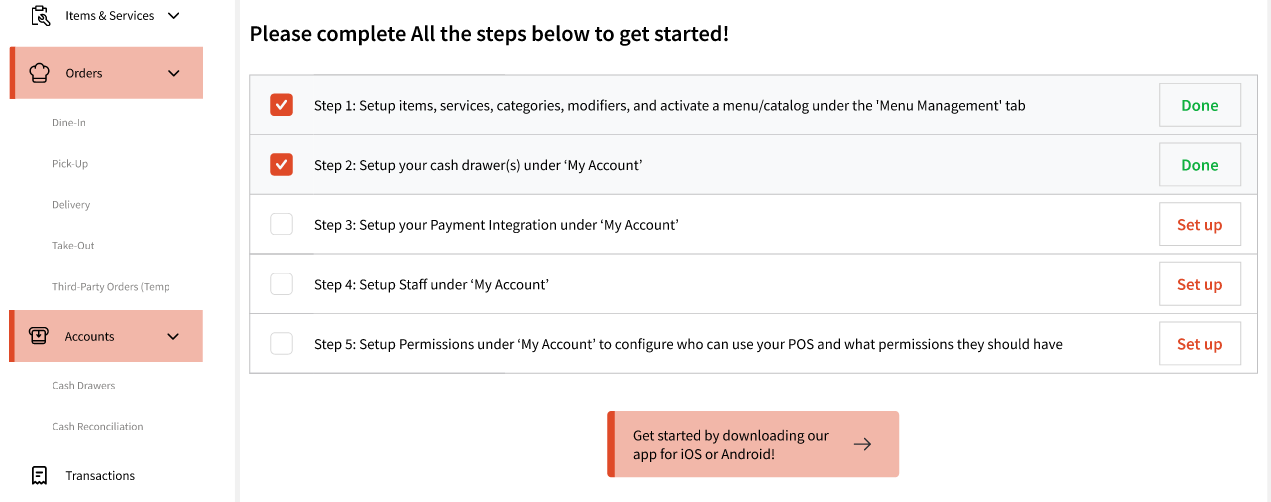
Step 1
This will take you to the POS Module to set up your items, services, categories, modifiers, and activate a menu/catalogue. Once you have set up at least 1 of each, the step will be marked as 'Done'.
Similarly, Step 2 will help you set up Cash Drawer(s) that will be used to track your transactions. Additionally, you will also be required to fill out 'Start' and 'End' day forms for each cash drawer you configure here, giving you the power to keep track of all your transactions.
Step 3 will allow to set up payment integration based on your region.
For US, you will be able to set up with DataCap payment integration.
For India, you will be able to set up with RazorPay.
Note: For now, our team will assist you with this integration, as we are still in the early phases of our launch. We are working toward making this process self-sufficient in later phases.
Step 4 will allow you set up your staff, along with schedule and assign them services (depending on your organization type)
Step 5 will ask you to configure your staff permissions. Once all done, you will be able to use our system!
Lastly, you can also use the link in the bottom to find links to the Staff and Tablet apps: